Key Takeaways
- Automation without integration is just faster note-taking. Connect notes to where work actually happens.
- One workflow doesn't fit all meetings. Categorize by decision stakes and automate accordingly.
- The feedback loop is the most overlooked component. Track action items to completion.
- Start simple, prove value, then scale. A working 80% solution beats a perfect 100% solution.
Table of Contents
- The Real Cost of "Good Enough" Note-Taking
- What "Scaling" Actually Means for Your Meeting Notes Workflow
- The Three-Layer Architecture of a Scalable Notes Automation Workflow
- Mapping Your Current Meeting Types to the Right Automation Level
- The Integration Chain — Connecting Notes to Your Existing Stack
- Building the Feedback Loop — How to Ensure Action Items Actually Get Done
- The Human-in-the-Loop Decision
- Measuring What Matters — KPIs for Your Meeting Notes Workflow
- Common Pitfalls When Scaling Your Workflow
- Getting Started — A 30-Day Plan
- Common Mistakes to Avoid
- Frequently Asked Questions
- Further Reading
The Real Cost of "Good Enough" Note-Taking
Most teams won't admit this: your meeting notes are a black hole. You pour time into capturing them, but they rarely come back out in a useful form.
Microsoft's WorkLab ran a study in 2025. Knowledge workers spend about 7.5 hours per week searching for or reconstructing information from meetings. That's nearly a full workday. For a mid-sized company with 200-500 employees, that "meeting debt" costs roughly $2.3 million annually in lost productivity.
That number should terrify you.
The hidden tax on every hire you make
Adding a new team member isn't just about salary. There's a hidden cost: the time everyone else spends bringing them up to speed. New hires need context. They need to know what was decided in the last three sprint planning meetings. They need to understand why the client pushed back on that feature.
If your meeting notes live in a shared doc nobody updates, that onboarding tax compounds with every hire. I've watched senior engineers burn 4-5 hours per week answering questions about decisions already made — the notes just never surfaced.
Why "we use a shared doc" is a scaling trap
Shared docs work for 5 people. At 20+, they become graveyards.
The signal-to-noise ratio tanks. Someone creates a doc for Monday standup. Then another for Tuesday's client call. Then a third because they couldn't find the first two. Pretty soon you have 47 meeting notes files, none linked to anything, and nobody knows which version is current.
I've walked into companies with 300+ meeting notes files in a shared drive. Nobody had opened 80% of them in months. But everyone felt guilty deleting them.
The 48-hour decay curve
The Asana Anatomy of Work study (2025) dropped a brutal stat: 41% of all meeting notes are never referenced again after 48 hours.
Think about that. Nearly half the time you spend capturing notes is wasted. The information decays faster than a fresh salad in a hot car.
Why? Because the notes are stored in a separate tool from where work happens. They live in Google Docs or Notion. But the work happens in Slack, Asana, Jira, and email. Nobody goes back to the doc. They just ask in Slack: "Hey, what did we decide about the pricing page?"
That question starts a chain of wasted time. Someone has to find the doc. Read it. Summarize it. Then the original conversation gets rehashed anyway.
The real cost isn't the meeting itself — it's the re-meeting. Teams that don't automate notes effectively re-discuss the same topics 2-3 times. That's the productivity leak nobody tracks.
What "Scaling" Actually Means for Your Meeting Notes Workflow
Most teams don't realize their note-taking workflow is broken until they hit 20 people. That's the inflection point.
Research from Harvard Business Review (2025) shows that teams scaling from 15 to 50+ employees see a 3x increase in meeting-related administrative overhead per person — unless they implement structured automation. At 15 people, manual note-taking feels manageable. At 20, it starts to crack. At 30, it's a crisis.
Volume vs. velocity
As you scale, the number of meetings grows. But the time available to process notes doesn't. A workflow that works for 10 meetings per week will break at 30 per week unless it's designed for zero-touch processing.
Here's what that looks like in practice: your PM spends 30 minutes after each client call cleaning up notes. That's fine for 3 client calls. But when you have 8 client calls, 3 internal standups, 2 sprint reviews, and an all-hands, that PM just lost 7 hours to note-processing alone.
The stakeholder spread problem
Notes need to reach different people in different formats. Execs want summaries — three bullet points, top decisions, no fluff. Devs want action items — what do I need to build, and by when? PMs want timeline updates — did we push the launch date again?
One-size-fits-all output fails everyone. The exec ignores the long summary. The dev skips the strategic context. The PM gets frustrated because the timeline change is buried in paragraph 12.
Compliance and auditability at scale
Once you cross certain team sizes — or start working with enterprise clients — you need a record of who decided what and when. Manual notes don't provide that reliably.
I've seen teams get burned by this. A client disputes a feature decision. A team member leaves and takes all the context with them. A legal question comes up about what was agreed to in a call. Without a structured, searchable audit trail, you're guessing.
The Three-Layer Architecture of a Scalable Notes Automation Workflow
Most tools stop at Layer 1. The real competitive advantage comes from Layers 2 and 3. Here's the framework I've seen work across dozens of teams.
Layer 1: Capture with structure, not just transcription
Raw transcription is noise. I don't care how accurate your speech-to-text is. A wall of text with no structure is useless.
The capture layer needs to:
- Identify speakers
- Tag decisions
- Flag action items
- Separate discussion from resolution
This is where AI note-takers differ from simple recorders. A recorder gives you a transcript. A structured capture tool gives you a meeting that's already organized.
Layer 2: Enrichment — turning notes into assets
Notes become useful when they're enriched with context. That means:
- Linking decisions to project timelines
- Tagging stakeholders
- Categorizing by meeting type (standup, client call, sprint planning)
- Adding priority levels to action items
Without enrichment, you have a transcript. With enrichment, you have a searchable knowledge asset.
Layer 3: Distribution — pushing to where work happens
This is where most workflows break. The final layer sends:
- Summaries to email
- Action items to Asana/Jira/Trello
- Decisions to Slack channels
- Full transcripts to a searchable knowledge base
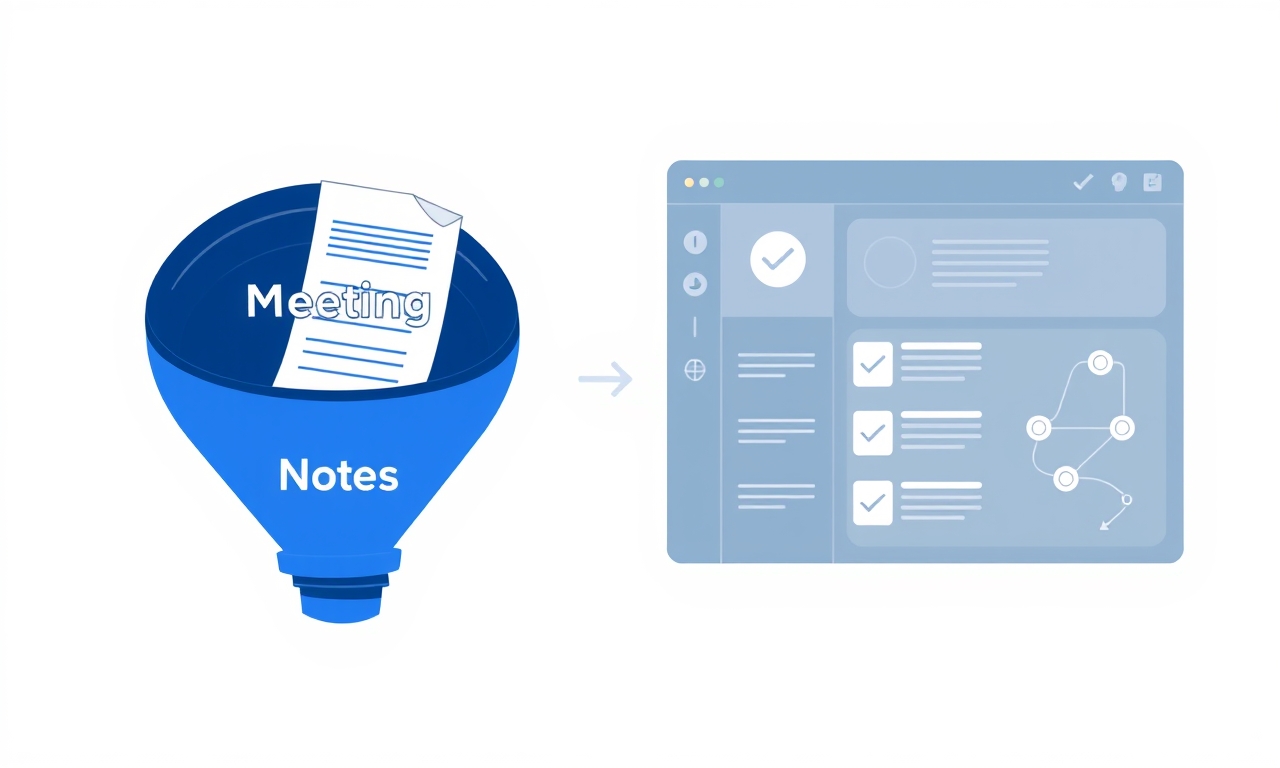
If the notes stay in the meeting tool, it's not a workflow. It's a silo. The whole point is to surface information where people already work.
Mapping Your Current Meeting Types to the Right Automation Level
Here's where most teams get it wrong: they apply the same automation level to every meeting.
High-stakes decisions (client calls, strategy sessions)
These need full capture plus human review. Automation handles transcription and initial structuring. A human reviews for accuracy before distribution. You don't want an AI misinterpreting a client's pricing objection and sending the wrong summary to your exec team.
Recurring tactical meetings (standups, sprint reviews)
Full automation works here. Standardized templates, auto-generated action items, and direct push to project management tools. No human review needed. The stakes are low, and the format is predictable.
Informational meetings (all-hands, company updates)
Summary-only automation. No action items expected. Just a digest for those who couldn't attend. Keep it short. Three paragraphs max.
The mistake is trying to automate everything equally. High-stakes meetings need a human in the loop. Low-stakes ones don't. Over-processing low-stakes meetings wastes time. Under-capturing high-stakes meetings creates risk.
The Integration Chain — Connecting Notes to Your Existing Stack
The project management handoff
Action items from meetings should appear as tasks in your PM tool automatically, with the meeting context attached. If someone has to copy-paste, the workflow has a leak.
I've seen teams where the PM spends 20 minutes after each meeting manually creating Jira tickets from notes. That's not a workflow. That's a tax.
The Slack/Teams notification layer
Not every meeting needs to notify everyone. Build rules:
- "Only send to channel if a decision was made"
- "Only notify assignee if action item is high priority"
- "Send weekly digest for low-priority items"
The searchable knowledge base
Every meeting transcript and summary should be indexed and searchable. When someone asks "what did we decide about X in Q3?", the answer should be one search away. Not a Slack scroll through 47 messages.
The most common integration failure isn't technical — it's notification fatigue. Teams connect everything to Slack, then ignore all notifications. Smart routing is critical.
Building the Feedback Loop — How to Ensure Action Items Actually Get Done
The "closed loop" principle
An action item isn't complete when it's assigned. It's complete when the task is marked done and the outcome is logged back to the meeting record. This creates a traceable chain.
Automated follow-up triggers
If an action item from a meeting hasn't been started within 48 hours, the workflow should automatically nudge the assignee. Optionally notify the meeting organizer too. This isn't about micromanagement. It's about preventing things from falling through the cracks.
The weekly "orphan action item" review
Set up a recurring automated report that surfaces any action items from the past 7 days that are still unassigned, unstarted, or overdue. Review it every Monday. It takes 5 minutes and catches problems before they become crises.
Most teams have a 30-40% action item completion rate. Teams that close the loop with automated follow-ups see that rise to 75-80%. Not because people work harder. Because things don't fall through the cracks.
The Human-in-the-Loop Decision
The 80/20 rule of automation
Automate the 80% of meetings that are routine. Keep a human reviewer for the 20% that involve sensitive client conversations, legal discussions, or strategic decisions.
Review cadence matters
A human review of automated notes should take less than 5 minutes per meeting. If it takes longer, the automation isn't tuned correctly. You're either capturing too much noise or not structuring the output well enough.
The "trust but verify" transition
Start with 100% human review. As your team gains confidence in the automation, reduce the frequency. Move to spot-checking. Then to exception-only review.
Teams that try to go 100% automated on day one fail. The automation needs to earn trust. That takes time.
Measuring What Matters — KPIs for Your Meeting Notes Workflow
Time saved per participant per week
Track the delta between manual note-taking and automated. Aim for 30-60 minutes saved per person per week. That's 2-4% of a 40-hour workweek recovered.
Action item completion rate
Measure before and after automation. A 20%+ improvement justifies the investment.
"Re-meeting" reduction
Track how often the same topic comes up in consecutive meetings because the decision wasn't captured. This is the hidden metric that reveals workflow quality.
Knowledge retrieval time
How long does it take someone to find "what was decided about X?" Measure before and after. If it drops from 15 minutes to 2 minutes, you've built something valuable.
The most impactful metric isn't time saved in meetings. It's time saved not having to re-discuss things. That's the compound interest of a good notes workflow.
Common Pitfalls When Scaling Your Workflow
Over-automating before the basics work
Don't connect to 10 tools until you've proven the capture and enrichment layers work for your team's meeting types. Start with one integration. Get it right. Then add more.
Ignoring the "notes consumer" perspective
Build the workflow for the person receiving the notes, not just the person taking them. If the output isn't useful to the reader, the workflow is wasted. I've seen teams build beautiful automation that nobody actually uses because the summaries were too long.
Treating all meetings as equal
A 15-minute standup and a 60-minute client negotiation need different automation rules. One workflow template doesn't fit all.
The #1 reason workflows fail at scale: they were designed by the person who takes notes, not the person who uses them. The user's needs should drive the design.
Getting Started — A 30-Day Plan to Build and Tune Your Workflow
Week 1: Audit and categorize
List every recurring meeting type. Categorize by decision stakes (high/medium/low). Identify current pain points in note capture and distribution.
Week 2: Set up capture and enrichment
Configure AI note-taking for your top 3 meeting types. Define templates for summaries, action items, and decisions.
Week 3: Connect distribution channels
Link to your PM tool, Slack/Teams, and knowledge base. Set up notification rules. Test with real meetings.
Week 4: Review, refine, and expand
Check action item completion rates. Gather feedback from note consumers. Tune templates. Add more meeting types.
Most teams try to build the perfect workflow in one sprint. The teams that succeed build a "good enough" version in week 1 and iterate. Perfection is the enemy of adoption.
Common Mistakes to Avoid
Mistake 1: Confusing transcription with structured notes
A wall of text isn't useful. The AI needs to extract decisions, action items, and owners. Not just transcribe everything said. If your tool gives you a transcript but no structure, you haven't automated anything meaningful.
Mistake 2: Not defining "done" for an action item
If your workflow doesn't track whether an action item was completed and what the outcome was, you're just creating a more efficient way to assign tasks that may never get done. Define "done" clearly. Track it. Close the loop.
Mistake 3: Building the workflow for yourself, not for your team
The person setting up the automation often optimizes for their own needs (the note-taker) rather than the people who actually consume the notes (execs, PMs, developers). This creates a workflow that looks good on paper but fails in practice. Ask your team what they need before you build anything.
Frequently Asked Questions
Can meeting notes automation replace the need for a dedicated note-taker?
For most recurring tactical meetings, yes. For high-stakes client or strategy meetings, keep a human reviewer in the loop. The automation handles the heavy lifting; the human ensures accuracy and context.
What's the minimum team size where meeting notes automation makes sense?
Around 15-20 people. Below that, manual note-taking is usually manageable. Above that, the administrative overhead starts to compound. The inflection point is around 20 employees.
How do I handle confidential or sensitive meetings in an automated workflow?
Use the 80/20 rule. Automate routine meetings. Keep sensitive meetings in a separate workflow with human review only. Most tools offer enterprise-grade security for handling sensitive content.
What happens if the AI misidentifies an action item or decision?
That's why you start with human review. As the automation learns your team's patterns, accuracy improves. Most teams find that after 2-3 weeks, the AI gets it right 90%+ of the time.
Do I need to train my team to use the automation, or does it work out of the box?
A brief onboarding session helps, but modern tools are designed to work with minimal setup.
Further Reading
- The 7-Step System for a Meeting Report PDF That Actually Gets Things Done — Learn how to structure meeting outputs for maximum actionability
- Why Your Meeting Summary Generator Is Creating More Work — Understand the "notes-to-nowhere" problem and how to fix it
- Microsoft WorkLab 2025: The Meeting Debt Crisis — Original research on the cost of poorly captured meeting information
Ready to Close the Loop on Your Meeting Notes?
You've seen the data. You know the costs. The question isn't whether to automate — it's how fast you can start.
The teams that win aren't the ones with the best ideas. They're the ones that execute on those ideas. And execution starts with capturing decisions, assigning actions, and following through.
Start with a 30-day plan. Prove the value. Then scale.